The File Storage Module
The master record of how your filing system is organized — the four SAFE areas, where each lives, naming, retention, and archive policy.
Where this Module fits
S-02 Module 2 of 6 in the System area — step 1 of 4 on the dependency ladder (System → At-Home → Financial → Estate).
Second — gives every record a findable home; the structure chosen here is the one both Guides follow everywhere else.
Adds to The Secure Guide: Master record of the filing structure — locations, naming, retention, archive policy.
Adds to The Family Guide: The shape of the system in one sentence, plus where a trusted person starts.
Every Module adds one section to each guide — that is how the two guides assemble as you work. See what you're building.
Text file — the flexible one. Use it as-is, paste it into a spreadsheet, open it in any editor, or paste it into an AI tool to reshape the blank form to fit your family: rename a field, add a row, drop one you don't need.
Print / PDF — the ready-to-use one. Print it and fill it in by hand, or choose Save as PDF and complete it in your own offline PDF app. Either way it stays with you — the finished Secure Guide template goes inside your Vault.
One rule: only ever give an AI tool the blank template. Never paste your real information — passwords, account numbers, anything you'd keep secret — into an AI tool, an online service, or anywhere outside your own Vault. Customizing an empty form is fine; filling it in happens privately, offline. That's the same rule this site follows: nothing sensitive ever leaves your hands.
Secure Guide Starter Template — File Storage
Store this inside your Vault. This section defines your family's implementation of the FIRM System — the standardized organization every other Module assumes. Anyone who finds it should be able to navigate the entire system from here. Update whenever the structure changes; review annually.
The FIRM System standard arrangement: family information is organized into four Areas of Focus — System, At-Home, Financial, and Estate — all held in one container: the FIRM Binder on paper, the FIRM Directory on disk. Each Area is a tab in the binder or a top-level directory inside it; each Module is a section behind its tab, a file inside its Area's directory — or a subdirectory, when a Module holds more than one document. The container itself is protected: a physical vault for the binder, encryption for the directory (built into the operating system, a third-party tool, or inside a reputable password manager).
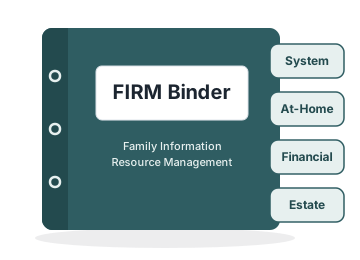
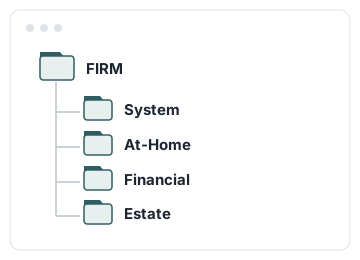
This Module is the heart of the FIRM System: the same four-Area shape organizes all three artifacts — The Vault, The Secure Guide, and The Family Guide — so this one record can navigate everything the family keeps, including the file system that holds this very page.
The system works best in that standard shape, so this record documents only where your arrangement differs from it. If a row or field below is blank, the standard applies.
| Container | Where it lives | How it is protected |
|---|---|---|
| FIRM Binder (paper) | ||
| FIRM Directory (digital) |
All four Areas of Focus live inside these — tabs in the binder, top-level folders in the directory. These hold the MASTER versions of both guides: The Secure Guide and The Family Guide are maintained here first, and every shared copy of The Family Guide is a duplicate of this master — update here, then re-distribute. Protection is the physical vault for paper, encryption for digital (OS-level, third-party, or within a reputable password manager).
| Module | In Use? | If not in the FIRM Binder/Directory, where it lives |
|---|---|---|
| S-01 Devices | ||
| S-02 File Storage | ||
| S-03 Network | ||
| S-04 Encryption | ||
| S-05 Passwords and Passkeys | ||
| S-06 Backup and Synchronize | ||
| A-01 Family Compass | ||
| A-02 Identities | ||
| A-03 Subscriptions and Memberships | ||
| A-04 Digital Legacy | ||
| A-05 Work History | ||
| A-06 Health and Medical | ||
| A-07 Mental Health and Well-Being | ||
| A-08 Pet Information and Care | ||
| F-01 Financial Accounts | ||
| F-02 Digital Financial Assets | ||
| F-03 Tax Planning and Documentation | ||
| F-04 Budget | ||
| F-05 Other Assets | ||
| F-06 Insurance | ||
| E-01 Disaster Preparedness | ||
| E-02 Communications | ||
| E-03 Heir Education | ||
| E-04 Elder Care | ||
| E-05 Funeral Wishes | ||
| E-06 Philanthropy | ||
| E-07 Friends and Family | ||
| E-08 Entities | ||
| E-09 Estate Plan | ||
Mark Yes (or a checkmark) if in use; No or N/A if not. Use the location column only when a Module's information is not in the FIRM Binder/Directory — note where it lives. Blank = the standard place, its Area's tab or folder. The two blank rows are for Modules your family adds.
Family Guide Starter Template — File Storage
This template contains no sensitive information. It can be stored with household documents.
In the matching Secure Guide section: master record of the filing structure — locations, naming, retention, archive policy.
That detail is what makes recovery possible — and it is protected in the Vault, which opens with The Vault Key. The key is never written here, by design. The people listed on this page know how it is kept, and the steward's job is to keep that path current, so this page never leads to a locked door.
Our family's information is organized with the FIRM System. Everything lives in four Areas of Focus — System, At-Home, Financial, and Estate — and each Area is made of Modules, each covering one topic (devices, health, insurance, the estate plan, and so on). The intent is a standardized organization of family information: everything has a known place, so the right person can find the right information when it matters.
The file system holding The Secure Guide is itself protected: on paper it sits inside the physical Vault; in digital form it is encrypted (see the Encryption Module).
Anything this page's reader should know that the sections above didn't ask for — the exceptions, the house quirks, the thing you would say out loud while handing this page over.
For more information on how to use these templates, see The Recoverable Family book.
Worked example — Frank's family
By week four of building his system, Frank's information life was complex enough for a two-container approach. The bulk of his Secure Guide became a SAFE-structured directory inside an encrypted volume on his laptop — four top-level folders named System, At-Home, Financial, and Estate, matching the tabs in his paper binder. Credentials stayed in the password manager under matching entry names. His File Storage section documents that shape once, and only the places his arrangement departs from the standard.
All details are fictional and illustrative. The assembled example guides live at the example Secure Guide and the example Family Guide.
Secure Guide — Frank's entry
Frank keeps the pre-printed paragraphs at the top of this section unchanged — the standard arrangement, the heart-of-the-system statement, and the blank-equals-standard rule. What follows is only his family's specifics and deviations.
| Container | Where it lives | How it is protected |
|---|---|---|
| FIRM Binder (paper) | Home office; four Area tabs | Home-office locked cabinet; irreplaceable originals in the fire safe |
| FIRM Directory (digital) | FrankSecure volume on Frank-Laptop; four Area folders | Third-party encryption (VeraCrypt); the key lives in the password manager |
| Module | In Use? | If not in the FIRM Binder/Directory, where it lives |
|---|---|---|
| S-01 Devices | ✓ | |
| A-08 Pet Information and Care | ✓ | A convenience copy of the care sheet is also posted inside the pantry door for the sitter |
| F-05 Other Assets | N/A | No significant assets beyond accounts yet — revisit at annual review |
| E-08 Entities | N/A | No business entities |
The other twenty-five rows are checked with the location blank — their information lives in the FIRM Binder/Directory, in its Area's tab or folder.
Family Guide — Frank's entry
This entry sits in the household reference binder in Frank's home office. It contains no sensitive information.
Our family's information is organized with the FIRM System: four Areas of Focus — System, At-Home, Financial, and Estate — each made of Modules covering one topic. Everything has a known place, so the right person can find the right information when it matters.
Our Secure Guide's file system is protected — the paper originals in the fire safe, the digital volume encrypted (see the Encryption Module).